Connection guide
 Keep in mind, that official Gadu-Gadu clients are only provided in Polish!
- Download the client of your choice from the downloads section. Original installers will make you go through a standard application setup process, while the portable versions will allow you to run gg.exe right away, without installation.
-
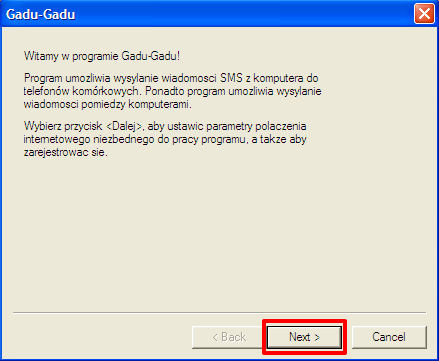
Open Gadu-Gadu and click "Next"
-
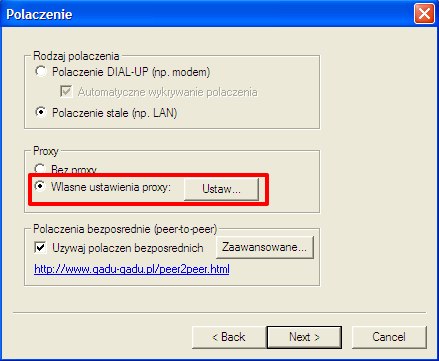
On the next screen, in the Proxy section, check "Own proxy settings" (Własne ustawienia proxy) and click on "Set" (Ustaw)
-
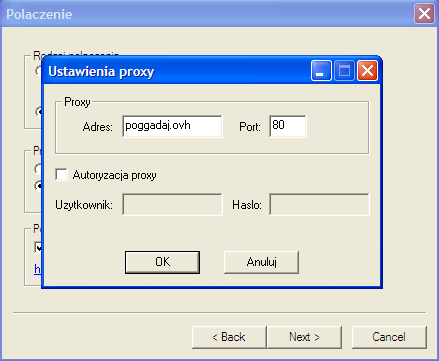
Set the proxy address to poggadaj.ovh and the port to 80, leave the authorization unchecked, and click OK
-
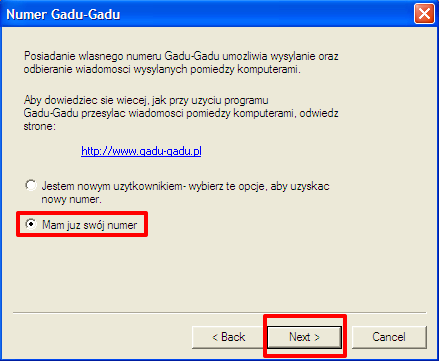
On the next screen, you will need to select "I already have a number" (Mam już swój numer). You should create a poGGadaj account if you haven't already!
-
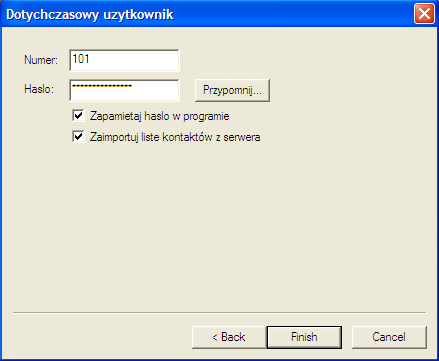
Now you can enter your credentials and click on Finish
-
Congratulations, you are now logged into poGGadaj!